**Describe the bug**
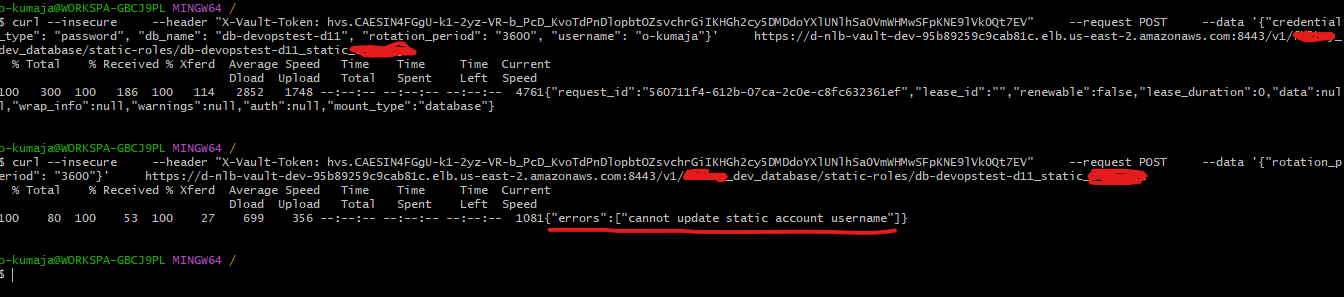
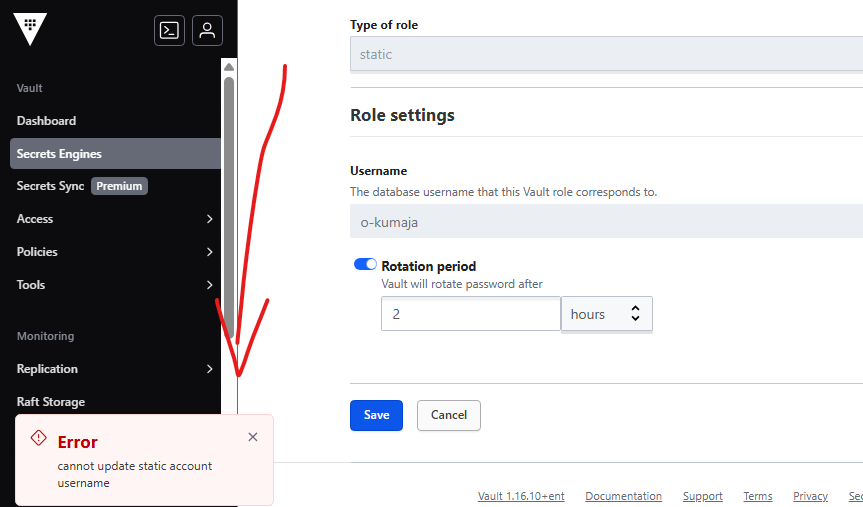
When using the MongoDB Database Plugin, I am unable to c…hange the rotation period of already-existing static-roles that are using a Mongo connection via the UI. Attempts to update it result in the error "cannot update static account username", forcing me to rewrite all fields via the CLI to make any changes (or deleting the re-creating the static-role in the UI). This issue occurs both when using the API/CLI and the Vault UI. Every other aspect of the static-role seems to be working properly.
Screenshot of the UI

The UI sends the following request to the Vault API
```
POST /v1/mongo/static-roles/testuser
{
"rotation_period": "259200s"
}
```
The same happens when using the vault write command via the CLI
```
vault write mongo/static-roles/testuser rotation_period="259200s"
Error writing data to mongo/static-roles/testuser: Error making API request.
URL: PUT https://myvaultsite.com/v1/mongo/static-roles/testuser
Code: 400. Errors:
* cannot update static account username
```
However, when I do a vault write and update all fields, it rotates successfully (I confirmed this by looking at the role in the UI after the fact also)
```
vault write mongo/static-roles/testuser \
credential_type=password \
db_name=mydb \
rotation_period="259200s" \
username=test \
rotation_statements=[]
```

I also tried using vault patch, but recieve an unsupported operator error.
```
vault patch mongo/static-roles/testuser rotation_period="259200s"
Error writing data to mongo/static-roles/testuser: Error making API request.
URL: PATCH https://myvaultsite.com/v1/mongo/static-roles/testuser
Code: 405. Errors:
* 1 error occurred:
* unsupported operation
```
Here are some audit logs for the request and response.
```
{"auth":{"accessor":"hmac-sha256:986b13a07ddcabca5ad94f97e00b0d53a8887d563a539cafc94153af2643b1e4","client_token":"hmac-sha256:dee42f2d3d84f61de7b0ec4c5781068b8ecf9fa936c972629a852f380c20d68f","display_name":"root","policies":["root"],"policy_results":{"allowed":true,"granting_policies":[{"name":"root","namespace_id":"root","type":"acl"}]},"token_policies":["root"],"token_issue_time":"2022-09-22T19:35:42Z","token_type":"service"},"request":{"client_id":"0DHqvq2D77kL2/JTPSZkTMJbkFVmUu0TzMi0jiXcFy8=","client_token":"hmac-sha256:dee42f2d3d84f61de7b0ec4c5781068b8ecf9fa936c972629a852f380c20d68f","client_token_accessor":"hmac-sha256:986b13a07ddcabca5ad94f97e00b0d53a8887d563a539cafc94153af2643b1e4","data":{"rotation_period":"hmac-sha256:5ce6f7b8abeab71925118e5e980bdd00ab684f64ea5bbaeb2274bd7f3c9ed499"},"id":"2198addd-b540-40e3-0bab-874654008035","mount_accessor":"database_99774590","mount_class":"secret","mount_point":"mongo/","mount_running_version":"v1.17.0+builtin.vault","mount_type":"database","namespace":{"id":"root"},"operation":"update","path":"mongo/static-roles/testuser","remote_address":"10.66.40.50","remote_port":38796},"time":"2024-07-12T19:43:09.576501845Z","type":"request"}
{"auth":{"accessor":"hmac-sha256:986b13a07ddcabca5ad94f97e00b0d53a8887d563a539cafc94153af2643b1e4","client_token":"hmac-sha256:dee42f2d3d84f61de7b0ec4c5781068b8ecf9fa936c972629a852f380c20d68f","display_name":"root","policies":["root"],"policy_results":{"allowed":true,"granting_policies":[{"name":"root","namespace_id":"root","type":"acl"}]},"token_policies":["root"],"token_issue_time":"2022-09-22T19:35:42Z","token_type":"service"},"request":{"client_id":"0DHqvq2D77kL2/JTPSZkTMJbkFVmUu0TzMi0jiXcFy8=","client_token":"hmac-sha256:dee42f2d3d84f61de7b0ec4c5781068b8ecf9fa936c972629a852f380c20d68f","client_token_accessor":"hmac-sha256:986b13a07ddcabca5ad94f97e00b0d53a8887d563a539cafc94153af2643b1e4","data":{"rotation_period":"hmac-sha256:5ce6f7b8abeab71925118e5e980bdd00ab684f64ea5bbaeb2274bd7f3c9ed499"},"id":"2198addd-b540-40e3-0bab-874654008035","mount_accessor":"database_99774590","mount_class":"secret","mount_point":"mongo/","mount_running_version":"v1.17.0+builtin.vault","mount_type":"database","namespace":{"id":"root"},"operation":"update","path":"mongo/static-roles/testuser","remote_address":"10.66.40.50","remote_port":38796},"response":{"data":{"error":"hmac-sha256:bd16e2b9cdd51f774ca9493ce5bd6d4d3cc29f718050124cfdaf57c8d7c47dd4"},"mount_accessor":"database_99774590","mount_class":"secret","mount_point":"mongo/","mount_running_plugin_version":"v1.17.0+builtin.vault","mount_type":"database"},"time":"2024-07-12T19:43:09.577225287Z","type":"response"}
```
**To Reproduce**
Steps to reproduce the behavior:
1. Enable a database secret engine
2. Configure a MongoDB connection:
3. Create a static role
4. Attempt to update only the rotation period using vault write or with the Vault UI.
**Expected behavior**
1. Vault should allow partial updates to static roles in the MongoDB secret engine.
2. Updating only the `rotation_period` should not trigger an error about updating the username.
3. The `vault write` command with only the `rotation_period` specified should successfully update just that field, leaving other fields unchanged.
4. The `vault patch` command should be supported for updating individual fields
**Environment:**
* Vault Server Version (retrieve with `vault status`): 1.17.0
* Vault CLI Version (retrieve with `vault version`): Vault v1.14.0
* Server Operating System/Architecture: Linux amd/64. Vault running on Kubernetes.
Vault server configuration file(s):
```hcl
/vault/config # cat vault.json
{"api_addr":"https://vault.vault-test:8200","cluster_addr":"https://vault-0:8201","experiments":["events.alpha1"],"listener":{"tcp":{"address":"0.0.0.0:8200","telemetry":{"unauthenticated_metrics_access":true},"tls_cert_file":"/vault/tls/server.crt","tls_key_file":"/vault/tls/server.key"}},"log_format":"json","service_registration":{"kubernetes":{"namespace":"myvaultnamespace"}},"storage":{"raft":{"path":"/vault/file"}},"telemetry":{"disable_hostname":true,"prometheus_retention_time":"24h"},"ui":true}
```
**Additional context**
Error message seems to be coming from here
https://github.com/hashicorp/vault/blob/56b32081f02b5da13ac24332e1ad7796233bff79/builtin/logical/database/path_roles.go#L561
Please let me know if any other information is required here. Thank you!